
Express checkout flow
This guide provides prerequisites and instructions for a complete integration.
Overview
The Express checkout flow is a front-end–only integration method that allows you to quickly integrate Centrobill’s payment system into your website using our Gateway JavaScript SDK. With a few lines of code, you can render a ready-to-use checkout button, securely process payments, and receive transaction results via callbacks.
Important domain restrictions
- Domain-bound public key: the Express Checkout flow uses a public key generated for a specific website (domain). The key can only be used on the exact domain for which it was issued.
- Script domain validation: the checkout script will execute only when loaded from the domain associated with the public key.
Note: If the public key is used on a different domain, the Express Checkout script returns empty content and the checkout flow will not initialize.
- Strict domain matching: the domain validation is strict. For example, www.example.com and example.com are treated as different domains.
How it works
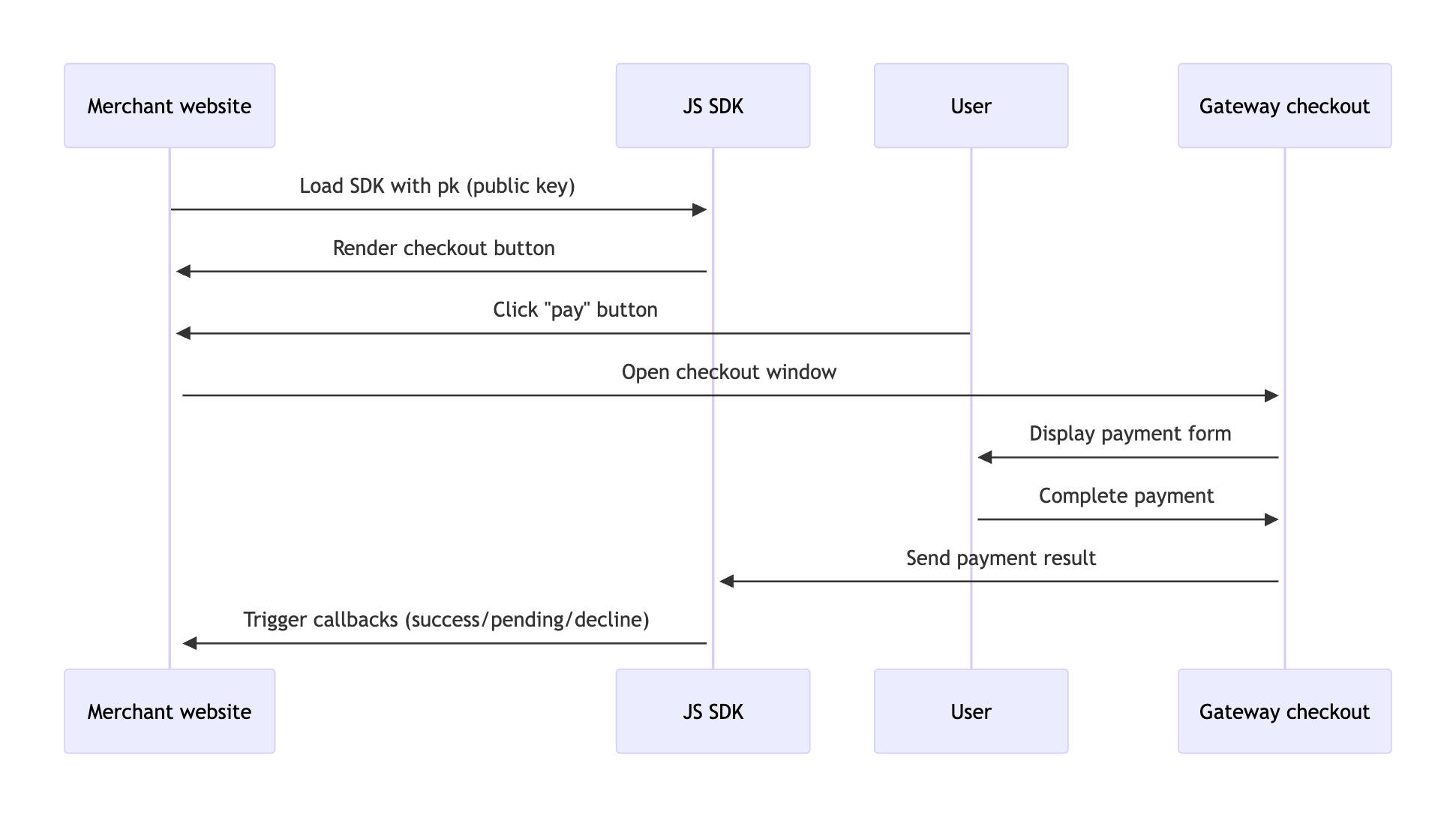
The Express checkout flow is built around the Centrobill JS SDK. You load the SDK on your page with a public key, and it renders a ready-to-use checkout button. When a user clicks the button, the SDK opens the Gateway checkout window, a secure, Centrobill-hosted page where the user enters their payment details. Once the payment is complete, the Gateway returns the result to the SDK, which triggers a callback on your page with the outcome.
Payload object structure in callbacks
The payload object structure in all callbacks is as follows:
{
  "payment": {
    "code": 0,
    "description": "Approved",
    "action": "charge",
    "mode": "sale",
    "status": "success",
    "amount": 5,
    "currency": "EUR",
    "orderId": "2523750694",
    "transactionId": "713882646",
    "descriptor": "Centro",
    "source": {
      "method": "card",
      "number": "47522501****9291",
      "paymentAccountId": "f3ad604e-1ab1-40a4-a24d-5cb1f6f5a38b",
      "brand": "visa",
      "expirationMonth": "05",
      "expirationYear": "27",
      "disabled": false
    },
    "apiPaymentSource": "card",
    "timestamp": {
      "dateTime": "2025-10-08 10:57:21",
      "timezone": "+02:00",
      "unixTime": 1759913841
    }
  },
  "consumer": {
    "id": "164608848",
    "email": "[email protected]",
    "firstName": "Card",
    "lastName": "Holder",
    "country": "DE",
    "zip": "14000",
    "address": "Mstyslavska str, 83, ft 60",
		"city": "Munich",
    "phone": "380937777777"
  },
  "metadata": []
}
Token handling
The system returns a paymentAccountId field (source.paymentAccountId), which serves as a reusable token for subsequent transactions. This token identifies the customer’s saved payment method and can be used, for example, for future charges without requiring the payment details again.
{
  "paymentAccountId": "f3ad604e-1ab1-40a4-a24d-5cb1f6f5a38b"
}
Shipping information
The Express checkout flow returns customer shipping details when available, depending on the country:
{
  "AT": ["first_name", "last_name", "address", "zip", "city", "country"],
  "BE": ["first_name", "last_name", "address", "zip", "city", "country"],
  "BG": ["first_name", "last_name", "address", "zip", "city", "district", "country"],
  "CH": ["first_name", "last_name", "address", "zip", "city", "country"],
  "CY": ["first_name", "last_name", "address", "zip", "city", "district", "country"],
  "CZ": ["first_name", "last_name", "address", "zip", "city", "country"],
  "DE": ["first_name", "last_name", "address", "zip", "city", "country"],
  "DK": ["first_name", "last_name", "address", "zip", "city", "country"],
  "EE": ["first_name", "last_name", "address", "zip", "city", "country"],
  "ES": ["first_name", "last_name", "address", "zip", "city", "province", "country"],
  "FI": ["first_name", "last_name", "address", "zip", "city", "country"],
  "FR": ["first_name", "last_name", "address", "zip", "city", "country"],
  "GB": ["first_name", "last_name", "address", "zip", "city", "country"],
  "GR": ["first_name", "last_name", "address", "zip", "city", "region", "country"],
  "HR": ["first_name", "last_name", "address", "zip", "city", "country"],
  "HU": ["first_name", "last_name", "address", "zip", "city", "country"],
  "IE": ["first_name", "last_name", "address", "eircode", "city", "country"],
  "IS": ["first_name", "last_name", "address", "zip", "city", "country"],
  "IT": ["first_name", "last_name", "address", "zip", "city", "province", "country"],
  "LT": ["first_name", "last_name", "address", "zip", "city", "country"],
  "LU": ["first_name", "last_name", "address", "zip", "city", "country"],
  "LV": ["first_name", "last_name", "address", "zip", "city", "country"],
  "MT": ["first_name", "last_name", "address", "zip", "city", "country"],
  "NL": ["first_name", "last_name", "address", "house_number", "zip", "city", "country"],
  "NO": ["first_name", "last_name", "address", "zip", "city", "country"],
  "PL": ["first_name", "last_name", "address", "zip", "city", "voivodeship", "country"],
  "PT": ["first_name", "last_name", "address", "zip", "city", "district", "country"],
  "RO": ["first_name", "last_name", "address", "zip", "city", "county", "country"],
  "RS": ["first_name", "last_name", "address", "zip", "city", "district", "country"],
  "SE": ["first_name", "last_name", "address", "zip", "city", "country"],
  "SI": ["first_name", "last_name", "address", "zip", "city", "country"],
  "SK": ["first_name", "last_name", "address", "zip", "city", "country"],
  "US": ["first_name", "last_name", "address", "zip", "city", "state", "country"],
  "CA": ["first_name", "last_name", "address", "zip", "city", "province", "country"]
}
Supported callbacks
buttonLoad— button loadedcheckoutOpen— checkout window openedcheckoutClose— checkout window closedpaymentSuccessful— payment was successfulpaymentDeclined— payment was declinedpaymentPending— payment is pending
Security
All encryption and security are handled automatically by the JS SDK and Gateway API.
Support
For further assistance, contact the Merchant support team at [email protected].
Updated 7 months ago