
Crypto payment flow
Crypto payment flow
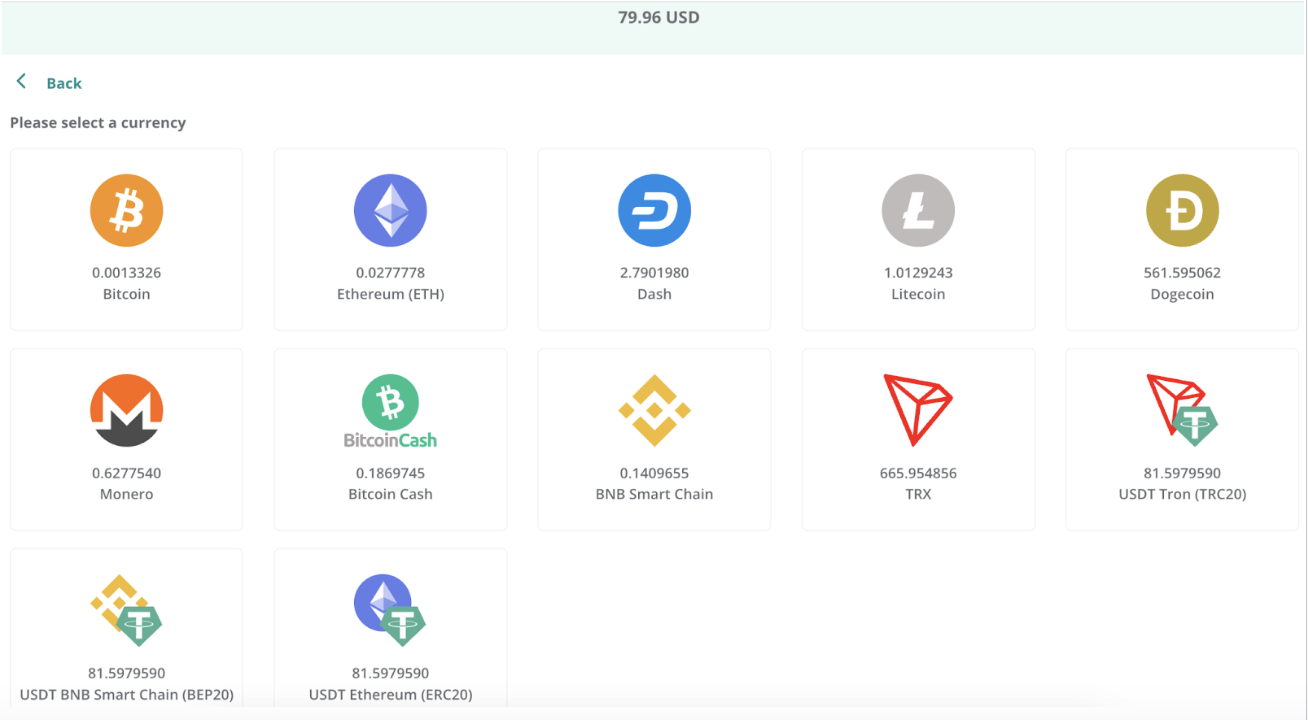
When a customer selects cryptocurrency as their payment method, Centrobill displays all cryptocurrencies enabled for the merchant. The product price is dynamically converted into the selected cryptocurrency and shown on the payment page.
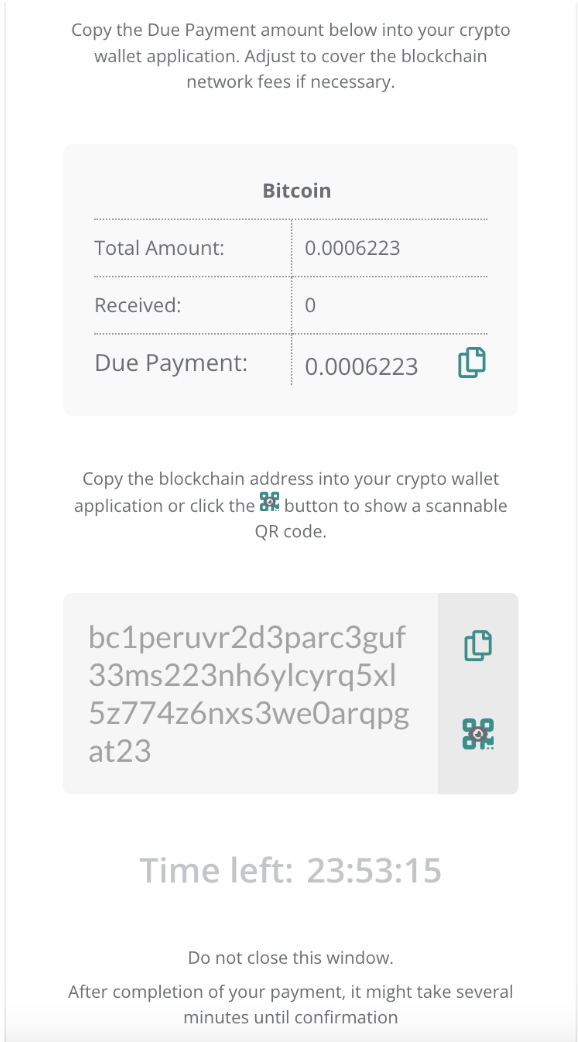
After selecting a cryptocurrency, the customer is redirected to a page showing the expected amount, the destination blockchain address, and a QR code for the transfer. Once the transfer is confirmed on the blockchain, the order status updates to success.
Peculiarities
Blockchain fee
Every cryptocurrency transaction incurs a blockchain fee determined by the network. This fee is deducted from the amount the customer sends — Centrobill does not collect blockchain fees.
Because the fee reduces the amount received, ensure your customers are aware they need to send enough to cover both the product price and the network fee. If the received amount doesn't cover the product cost, the order expires with code 5099. See Crypto order investigation if you need to investigate an underpaid or unconfirmed order.
Mainnets
Payments must be made on primary blockchain networks (mainnets) using the native cryptocurrency for each coin or token. Sending crypto via sidechains and Layer 2 chains can result in lost funds, which cannot be recovered or refunded. See supported cryptocurrencies and blockchains for the full list of supported networks.
WarningIf customers send funds via unsupported networks or send unsupported cryptocurrencies, the funds will be lost and cannot be collected or refunded.
Taproot (Bitcoin)
When paying with Bitcoin, customers are provided with a Bech32m wallet address — a standard Taproot wallet consisting of 62 characters. Each order is associated with a unique wallet address. Once the wallet receives funds, the amount is linked to that specific order ID.
Customers must not reuse the wallet address for any transaction outside of the original order unless approved by the Merchant Support team.
Note
Check whentaproot.org to see which wallets support the Taproot format.
Crypto request via Server-to-server
To initiate a crypto payment via the server-to-server flow, set paymentSource.type to "crypto" and pass the price in fiat currency using the ISO3 currency code. Centrobill converts the fiat amount to the cryptocurrency the customer selects.
Request example:
{
  "paymentSource": {
    "type": "crypto"
  },
  "sku": {
    "title": "Test",
    "siteId": "1211118",
    "price": [
      {
        "offset": "0d",
        "amount": 50,
        "currency": "EUR",
        "repeat": false
      }
    ]
  },
  "consumer": {
    "externalId": "TestXXXXX",
    "email": "*****@gmail.com",
    "firstName": "Jonny",
    "lastName": "Sonny",
    "birthday": "1958-01-16",
    "phone": "33xxxxxx293",
    "country": "FRA",
    "address": "0000 grande rue",
    "city": "miribel",
    "zip": "01700",
    "ip": "xx.xxx.xxx.xx",
    "userAgent": "Mozilla/5.0 (Linux; Android 10; K) AppleWebKit/537.36 (KHTML, like Gecko) Chrome/124.0.0.0 Mobile Safari/537.36",
    "browserAcceptHeader": "application/json, text/plain, */*",
    "browserJavaEnabled": false,
    "browserLanguage": "fr-FR",
    "browserColorDepth": 24,
    "browserScreenHeight": 848,
    "browserScreenWidth": 424,
    "browserTimezone": "-120"
  },
  "url": {
    "ipnUrl": "https://test.com/Centrobill/",
    "redirectUrl": "https://url_to_redirect_customer.com/"
  },
  "metadata": {
    "transactionId": "00000000000000000000000XXXXXXXXXX"
  }
}
A successful response returns payment.action: "redirect" and a payment.url to which you redirect the customer to complete the transfer:
{
  "payment": {
    "code": 0,
    "description": "Approved",
    "action": "redirect",
    "mode": "sale",
    "status": "pending",
    "amount": 39.99,
    "currency": "USD",
    "orderId": "2460009474",
    "transactionId": "560000322",
    "descriptor": "centrobill.com",
    "url": "https://test.centrobill.com/d7e9fb84-175b-11ef-8226-0aa7e3e359a8",
    "source": {
      "method": "crypto",
      "number": "0****0000",
      "paymentAccountId": "a23af5a4-166a-4af4-8a42-a9f23ab61608",
      "disabled": false
    },
    "apiPaymentSource": "crypto",
    "timestamp": {
      "dateTime": "2024-05-21 12:21:06",
      "timezone": "+02:00",
      "unixTime": 1716286866
    }
  },
  "consumer": {
    "id": "135580422",
    "email": "[email protected]",
    "firstName": "Jonny",
    "lastName": "Sonny",
    "phone": "33612345293",
    "country": "FRA",
    "city": "miribel",
    "zip": "01700",
    "address": "0000 grande rue"
  },
  "metadata": {
    "transactionId": "XXXXXXXXX"
  }
}
Redirect the customer to payment.url. The payment status remains pending until the blockchain confirms the transfer. The final result is delivered to your ipnUrl via IPN callback.
Crypto request via Hosted payment page
To accept crypto via the Hosted Payment Page, set payment.selected to "crypto" and pass the price in fiat currency. Centrobill handles the currency selection and conversion on the payment page.
Request example:
{
  "consumer": {
    "externalId": "cryptouser101",
    "email": "[email protected]",
    "firstName": "Jonny",
    "lastName": "Sonny",
    "ip": "22.000.111.44"
  },
  "payment": {
    "selected": "crypto"
  },
  "metadata": {
    "transactionId": "XXXXXXXXXX"
  },
  "sku": [
   {
      "url": {
        "ipnUrl": "https://hpp.payment.com/Centrobill/",
        "redirectUrl": "https://hpp.payment.com/Centrobill/"
      },
      "price": [
        {
          "offset": "0d",
          "amount": 39.99,
          "currency": "USD",
          "repeat": false
        }
      ],
      "title": "Crypto Deposit",
      "siteId": "1234567"
    }
  ]
}
'
A successful response returns a URL to redirect the customer to:
{
  "code": 0,
  "url": "https://pay.centrobill.com/8e8d2825f0c2a9f56cc04d66a4e4ca11/home"
}
Handling the payment result
Crypto payments always resolve asynchronously. The synchronous response returns payment.status: "pending" — the final result arrives via IPN callback once the blockchain confirms the transfer. Do not fulfil orders based on the synchronous response alone.
If an order expires before confirmation (code 5099), see Investigate crypto order for how to raise an investigation with the Merchant Support team.
Updated 4 months ago